顯示具有 Week05 標籤的文章。 顯示所有文章

2019年5月23日 星期四

嗶啵啵嗶啵2019/0321_W5

Week05
主題:旋轉

---------------------------------------------------------------------------------------------------
~開啟範例~
      載data、win32、glut32.dll 

2.先將window解壓縮、data移至window裡、glut32.dll 也移到window裡


~開啟GLIT專案~
1.開啟GLUT專案
(記得載freeglut的資料夾、lib資料夾要有libglut32.a)


2.讓茶壺自動旋轉
#include <GL/glut.h>
float angle=0;///宣告
 void display()
{
    glClear(GL_COLOR_BUFFER_BIT | GL_DEPTH_BUFFER_BIT);///沒有clear()清除畫面會留殘影
    glPushMatrix();///備份矩陣
        glRotatef(angle, 0 ,1 ,0);///對Y軸轉angle角度
        glutSolidTeapot(0.3);
    glPopMatrix();///還原矩陣,不然會跑掉!!
    glutSwapBuffers();
    angle+=3;///每次執行加一點點
}
int main(int argc, char**argv)
{
    glutInit(&argc,argv);
    glutInitDisplayMode(GLUT_DOUBLE|GLUT_DEPTH);
    glutCreateWindow("06160531_Week05!!");
    glutDisplayFunc(display);
    glutIdleFunc(display);/// Idle:重畫
    glutMainLoop();

}


3.按滑鼠後就可以用滑鼠旋轉
#include <GL/glut.h>
float angle=0;
 void display()
{
    glClear(GL_COLOR_BUFFER_BIT | GL_DEPTH_BUFFER_BIT);///沒有clear()清除畫面會留殘影
    glPushMatrix();///備份矩陣
        glRotatef(angle, 0 ,1 ,0);///對Y軸轉angle角度
        glutSolidTeapot(0.3);
    glPopMatrix();///還原矩陣,不然會跑掉!!
    glutSwapBuffers();
    ///要刪掉!!不然會自動旋轉 angle+=3;///每次執行加一點點
}
void motion(int x,int y)///滑鼠控制

{
     angle=x;///2.mouse motion移動
    display();
}
#include <stdio.h>
void mouse(int button, int state, int x, int y)///1.mouse按下去  3.mouse放開
{
    printf("%d %d %d %d\n",button,state,x,y);
}

int main(int argc, char**argv)
{
    glutInit(&argc,argv);
    glutInitDisplayMode(GLUT_DOUBLE|GLUT_DEPTH);
    glutCreateWindow("06160531_Week05!!");
    glutDisplayFunc(display);
    glutIdleFunc(display);/// Idle:重畫
    glutMotionFunc(motion);///滑鼠控制
    glutMouseFunc(mouse);///mouse
    glutMainLoop();
}


2019年5月2日 星期四

06161082_w5

<旋轉Rotation>
glRotatef()
Examples: [data]、[win32]、glut32.dll>將[win32]解壓縮> 把[data]、glut32.dll、放進[win32]資料夾 > 打開範例Transformation.exe


<代入滑鼠程式碼>
原始程式碼刪除並打入新的程式碼


加入跟著滑鼠旋轉的程式碼(需把angle+=3刪除掉)

#include <GL/glut.h>
float angle=0;
void display()
{
    glClear(GL_COLOR_BUFFER_BIT|GL_DEPTH_BUFFER_BIT);
    glPushMatrix();
        glRotatef(angle,0,1,0);
        glutSolidTeapot( 0.3 );
    glPopMatrix();
    glutSwapBuffers();
}
void motion(int x,int y)
{
    angle=x;
    display();
}
#include <stdio.h>
void mouse(int button,int state,int x,int y)
{
    printf("%d %d %d %d\n",button,state,x,y);
}
int main(int argc,char**argv)
{
    glutInit(&argc,argv);
    glutInitDisplayMode(GLUT_DOUBLE|GLUT_DEPTH);
    glutCreateWindow("06160540");
    glutDisplayFunc(display);
    glutIdleFunc(display);
    glutMotionFunc(motion);
    glutMouseFunc(mouse);     
    glutMainLoop();
}
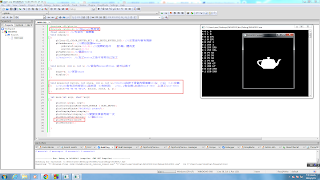
2019年3月28日 星期四

04160702張均寶_W5


#include <GL/glut.h>
void display(){

    glutSolidTeapot(0.3);
    glutSwapBuffers();

}
int main(int argc,char **argv)
{
    glutInit(&argc,argv);
    glutInitDisplayMode(GLUT_DOUBLE);
    glutCreateWindow("Week06");

    glutDisplayFunc(display);

    glutMainLoop();
}

2019年3月26日 星期二

電腦圖學成長日記第五週~

第五週上課內容

A.主題:旋轉Rotation

B.實作:glRotatef()

C.滑鼠:自動轉動

1.下載跟之前幾堂一樣的檔案,然後再拉到應對的資料夾


2.舉例:旋轉

3.旋轉程式碼

4.跑出來的結果

5.紅框框部分做修改

6.按下滑鼠可以跑出數字


7.執行後的結果為(滑鼠左鍵值為0/中鍵值為1/右鍵值為2)


 最後:變色


2019年3月21日 星期四

Week05 鍾嘉穎 2019-03-21

1. 主題: 旋轉 Rotation
       1. 點進去小葉的網頁: http://www.cmlab.csie.ntu.edu.tw/~jsyeh/3dcg10/
       2. 下載 Example裏的 win32, glut32.dll, data
       3. 解壓縮到下載
       4. 把已解壓的 data 資料夾拉到windows裏
       5. 把已解壓的 glut32.dll 資料夾拉到windows裏
       6. 打開 Transformation.exe

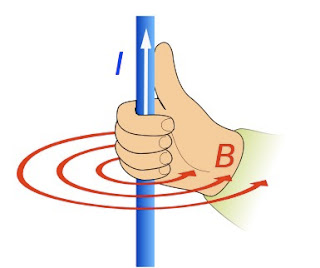
       Rotate: 旋轉 (使用右手定律 找到旋轉的方向)
      +: 跟著手指的方向
      -: 反方向
      軸: 大母指 (會從(0,0,0) 開始到設定的點)
      角度會沿著大母指轉


      glRotatef(角度, X軸, Y軸, Z軸);


2. 實作: glRotatef();
      1. 先載入freeglut (跟第一週一樣)
           1. Google search "freeglut windows"
              2. 從Transmission Zero 下載 "freeglut 3.0.0 MinGW Package"
              3. 解壓縮後放到桌面
              4. 在lib複製一個"libfreeglut.a"命名為"libglut32.a"
              5. CodeBlocks 開
              6. File  ->  New -> Project -> GLUT Project
              7. 把location改成"C:\Users\user\Desktop\freeglut"
      2. 把main的程式碼刪掉
      3. 把程式碼打上去

3. 滑鼠轉, 自動轉

      自己轉的程式碼:

                #include <GL/glut.h>
                float angle=0; ///先宣告一個變數
                void display()
                {
                    glClear(GL_COLOR_BUFFER_BIT | GL_DEPTH_BUFFER_BIT);
                    glPushMatrix(); ///備份保護Matrix
                        glRotatef(angle,0,1,0); ///旋轉的指令
                        glutSolidTeapot(0.3);
                    glPopMatrix();///還原Matrix
                    glutSwapBuffers();
                    angle+=3; ///每執行一次角度都會加一點點
                }
                int main(int argc, char**argv)
                {
                    glutInit(&argc, argv);
                    glutInitDisplayMode(GLUT_DOUBLE | GLUT_DEPTH);
                    glutCreateWindow("06160912 rotate");
                    glutDisplayFunc(display);
                    glutIdleFunc(display);///閒閒沒事會再做一次
                    glutMainLoop();
                }


      用滑鼠控制的程式碼: (改上面的程式) (但會卡卡的)(加了綠色的程式碼)

                #include <GL/glut.h>
                float angle=0; ///先宣告一個變數
                void display()
                {
                    glClear(GL_COLOR_BUFFER_BIT | GL_DEPTH_BUFFER_BIT); ///不寫這句會有殘影
                    glPushMatrix(); ///備份保護Matrix
                        glRotatef(angle,0,1,0); ///旋轉的指令    對Y軸, 轉角度
                        glutSolidTeapot(0.3);
                    glPopMatrix();///還原Matrix
                    glutSwapBuffers();
                    ///angle+=3;  ///加了motion之後不用再自己加了
                }
                void motion (int x, int y) ///當你的mouse去drag, 就可以做了
                {
                    angle=x; ///更新angle
                    display();
                }
                int main(int argc, char**argv)
                {
                    glutInit(&argc, argv);
                    glutInitDisplayMode(GLUT_DOUBLE | GLUT_DEPTH);
                    glutCreateWindow("06160912 rotate");
                    glutDisplayFunc(display);
                    glutIdleFunc(display);///閒閒沒事會再做一次
                    glutMotionFunc(motion); ///跑motion
                    glutMainLoop(); ///如果忘了寫這句或忘了括號() 就會離開 (跑不出來)
                }


4. 滑鼠事件: 把大象放入冰箱

      為了不會卡卡的, 所以要多加一個滑鼠的函式 (加了藍色的程式碼)

                #include <GL/glut.h>
                  #include <stdio.h> ///加printf要用到
                float angle=0; ///先宣告一個變數
                void display()
                {
                    glClear(GL_COLOR_BUFFER_BIT | GL_DEPTH_BUFFER_BIT); ///不寫這句會有殘影
                    glPushMatrix(); ///備份保護Matrix
                        glRotatef(angle,0,1,0); ///旋轉的指令    對Y軸, 轉角度
                        glutSolidTeapot(0.3);
                    glPopMatrix();///還原Matrix
                    glutSwapBuffers();
                    ///angle+=3;  ///加了motion之後不用再自己加了
                }
                void motion (int x, int y) ///當你的mouse去drag, 就可以做了
                {
                    angle=x; ///更新angle
                    display();
                }
                void mouse(int button, int state, int x, int y)///button指按了滑鼠的哪個鍵(1=左  2=右  3,4=中鍵)
                {   ///state指有沒有按到(1=沒按到  0=有按到)   ///x, y指坐標(左到右<x=0-300>  上到下<y=0-300>)
                    printf("%d %d %d %d\n", button, state, x, y);
                }
                int main(int argc, char**argv)
                {
                    glutInit(&argc, argv);
                    glutInitDisplayMode(GLUT_DOUBLE | GLUT_DEPTH);
                    glutCreateWindow("06160912 rotate");
                    glutDisplayFunc(display);
                    glutIdleFunc(display);///閒閒沒事會再做一次
                    glutMotionFunc(motion); ///跑motion
                      glutMouseFunc(mouse);

                    glutMainLoop(); ///如果忘了寫這句或忘了括號() 就會離開 (跑不出來)
                }