2019年6月12日 星期三

2019年6月6日 星期四
2019年5月30日 星期四


2019年5月23日 星期四
week14_showshowshow的筆記
1.主題:計時器

#include <GL/glut.h>
#include <mmsystem.h>
#include <stdio.h>
void display()
{
glClear(GL_COLOR_BUFFER_BIT | GL_DEPTH_BUFFER_BIT);
glutSolidTeapot( 0.3 );
glutSwapBuffers();
}
void timer(int t)
{
glutTimerFunc(1000,timer,t+1);
printf("t=%d",t);
PlaySoundA("bird.wav",NULL,SND_ASYNC);
}
int main(int argc, char**argv)
{
glutInit(&argc, argv);
glutInitDisplayMode(GLUT_DOUBLE | GLUT_DEPTH);
glutInitWindowSize(500,500);
glutCreateWindow("week 14 timer");
glutDisplayFunc(display);
glutTimerFunc(1000,timer,0);
glutMainLoop();
}
2.主題:內插公式
3.主題:動畫


#include <GL/glut.h>
#include <mmsystem.h>
float angle=0;
float nowX=0;
void display()
{
glClear(GL_COLOR_BUFFER_BIT | GL_DEPTH_BUFFER_BIT);
glPushMatrix();
glTranslatef(nowX,0,0);
glutSolidTeapot( 0.3 );
glPopMatrix();
glutSwapBuffers();
}
void timer(int t)
{
///1000 ms =1 sec,30 ms =1/33 sec,33 fps
glutTimerFunc(30,timer,t+1);
float alpha=(t%33)/33.0;///alpha內插
nowX=alpha*1+(1-alpha)*-1;
alpha+=1;
glutPostRedisplay();///系統重繪畫面
PlaySoundA("bird.wav",NULL,SND_ASYNC);
}
int main(int argc, char**argv)
{
glutInit(&argc, argv);
glutInitDisplayMode(GLUT_DOUBLE | GLUT_DEPTH);
glutInitWindowSize(500,500);
glutCreateWindow("week 14 timer");
glutDisplayFunc(display);
glutTimerFunc(1000,timer,0);
glutMainLoop();
}
4.上週hw問題回覆
5.期末作品
2019年5月16日 星期四
week13_showshowshow的筆記
1.主題:檔案
開啟codeblock-新專案console application
#include <stdio.h>
FILE*fout=NULL;///(1)宣告一個檔案指標
int main()
{///檔案寫檔
fout=fopen("filename.txt","w+");///(2)我們要開檔案
for(int i=0;i<20;i++)
{
fprintf(fout,"Hello World\n");///(3)印出來到檔案
}
}

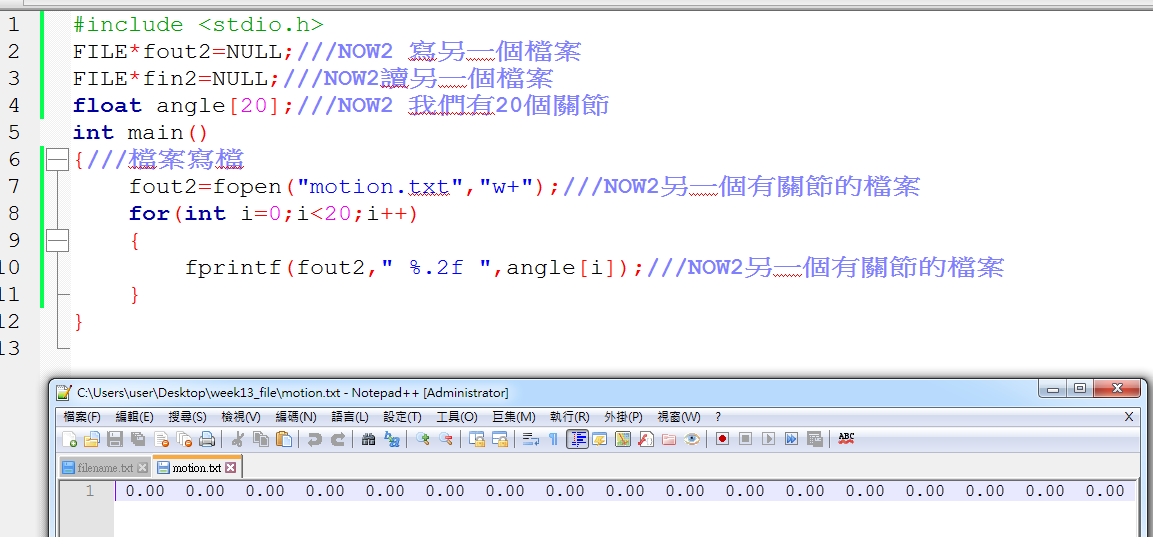
執行後會自動產生filename.txt

打開後結果

#include <stdio.h>
FILE*fout2=NULL;///NOW2 寫另一個檔案
FILE*fin2=NULL;///NOW2讀另一個檔案
float angle[20];///NOW2 我們有20個關節
int main()
{///檔案寫檔
fout2=fopen("motion.txt","w+");///NOW2另一個有關節的檔案
for(int i=0;i<20;i++)
{
fprintf(fout2," %.2f ",angle[i]);///NOW2另一個有關節的檔案
}
}

2.主題:關節 改動作


3.主題:複習
4.作業:機器人擺動作


開啟codeblock-新專案console application
#include <stdio.h>
FILE*fout=NULL;///(1)宣告一個檔案指標
int main()
{///檔案寫檔
fout=fopen("filename.txt","w+");///(2)我們要開檔案
for(int i=0;i<20;i++)
{
fprintf(fout,"Hello World\n");///(3)印出來到檔案
}
}

執行後會自動產生filename.txt

打開後結果

#include <stdio.h>
FILE*fout2=NULL;///NOW2 寫另一個檔案
FILE*fin2=NULL;///NOW2讀另一個檔案
float angle[20];///NOW2 我們有20個關節
int main()
{///檔案寫檔
fout2=fopen("motion.txt","w+");///NOW2另一個有關節的檔案
for(int i=0;i<20;i++)
{
fprintf(fout2," %.2f ",angle[i]);///NOW2另一個有關節的檔案
}
}
2.主題:關節 改動作


3.主題:複習
4.作業:機器人擺動作


2019年5月9日 星期四
week12_showshowshow的筆記
1.主題:鍵盤
2.主題:聲音,音樂
3.複習:街層TRT骨架
4.作業:能操控的機器人
(1)在網頁上下載wav檔 利用程式播放音樂
#include <windows.h>
///(3)因為一些基礎Window型別,要在mmsystem之前
#include <mmsystem.h>
///(1) Multimedia System裡面有聲音的函式
int main()
{
PlaySoundA("C:\\Users\\user\\Desktop\\pup.wav",NULL,SND_SYNC);
///(2)播放聲音 Play Sound ASCII英文的檔名,......沒有人,SoundSync
}
///最後在執行時,專案的設定,要在link時,加入一個winmm的library

(2)另開一個GLUT專案 加入程式碼 利用鍵盤設定音樂

(3)加入CMP3_MCI.h 即可播放mp3檔和wma檔


2019年5月2日 星期四
2019年4月25日 星期四
week10_showshowshow的筆記
1.期中考:OpenGL10函式
2.複習:移動,旋轉,縮放
3.主題:T-R-T 旋轉(改變旋轉軸)
#include <GL/glut.h>
float angle=0;
void display()
{
glClear(GL_COLOR_BUFFER_BIT|GL_DEPTH_BUFFER_BIT);
glPushMatrix();
glTranslatef(0,0.5,0);///往上移動的茶壺
glutSolidTeapot(0.3);
glPopMatrix();
glPushMatrix();
glTranslatef(0.5,0.625,0);///(3)把它掛在你要的地方
glRotatef(angle,0,0,1);///(1)先有個轉動,但怪怪的
glTranslatef(0.6,0,0);///(2)要更早去移動旋轉中心
glRotatef(-90,0,1,0);///轉動90度的cone
glutSolidCone(0.2,0.6,30,30);///直直的cone
glPopMatrix();
glutSwapBuffers();
}
void motion(int x,int y)
{
angle = x;
display();///滑鼠motion馬上更新
}
int main(int argc,char**argv)
{
glutInit(&argc,argv);
glutInitDisplayMode(GLUT_DOUBLE|GLUT_DEPTH);
glutCreateWindow("week10");
glutDisplayFunc(display);
glutMotionFunc(motion);///滑鼠motion
glutMainLoop();
}


4.主題:glut
2.複習:移動,旋轉,縮放
3.主題:T-R-T 旋轉(改變旋轉軸)
#include <GL/glut.h>
float angle=0;
void display()
{
glClear(GL_COLOR_BUFFER_BIT|GL_DEPTH_BUFFER_BIT);
glPushMatrix();
glTranslatef(0,0.5,0);///往上移動的茶壺
glutSolidTeapot(0.3);
glPopMatrix();
glPushMatrix();
glTranslatef(0.5,0.625,0);///(3)把它掛在你要的地方
glRotatef(angle,0,0,1);///(1)先有個轉動,但怪怪的
glTranslatef(0.6,0,0);///(2)要更早去移動旋轉中心
glRotatef(-90,0,1,0);///轉動90度的cone
glutSolidCone(0.2,0.6,30,30);///直直的cone
glPopMatrix();
glutSwapBuffers();
}
void motion(int x,int y)
{
angle = x;
display();///滑鼠motion馬上更新
}
int main(int argc,char**argv)
{
glutInit(&argc,argv);
glutInitDisplayMode(GLUT_DOUBLE|GLUT_DEPTH);
glutCreateWindow("week10");
glutDisplayFunc(display);
glutMotionFunc(motion);///滑鼠motion
glutMainLoop();
}


4.主題:glut
2019年4月11日 星期四
week08_showshowshow的筆記
1.主題:貼圖 Texture
2.範例:Texture.exe

3.實作:OpenCV
第一步:下載OpenCV2.1
第二步:開啟CodeBlocks
第三步:找一張圖片 也可以自己用小畫家畫一張
第四步:寫程式
#include<GL/glut.h>#include<opencv/highgui.h>
void display()
{
glClear(GL_COLOR_BUFFER_BIT|GL_DEPTH_BUFFER_BIT);
glutSolidTeapot(0.3);
glutSwapBuffers();
}
int main(int argc,char**argv)
{
IplImage * img=cvLoadImage("star.png");
cvShowImage("opencv Window",img);
cvWaitKey(0);
glutInit(&argc,argv);
glutInitDisplayMode(GLUT_DOUBLE|GLUT_DEPTH);
///glutCreateWindow("week08");
glutDisplayFunc(display);
glutMainLoop();
}

4.實作:OpenCV+OpenGL 貼圖
5.期中考:10行OpenGL程式
2019年3月28日 星期四
week06_showshowshow的筆記
1.主題:打光PART1


///紅字為新教的 #include <GL/glut.h>
const GLfloat light_ambient[] = { 0.0f, 0.0f, 0.0f, 1.0f };
const GLfloat light_diffuse[] = { 1.0f, 1.0f, 1.0f, 1.0f };
const GLfloat light_specular[] = { 1.0f, 1.0f, 1.0f, 1.0f };
const GLfloat light_position[] = { 2.0f, 5.0f, 5.0f, 0.0f };
const GLfloat mat_ambient[] = { 0.7f, 0.7f, 0.7f, 1.0f };
const GLfloat mat_diffuse[] = { 0.8f, 0.8f, 0.8f, 1.0f };
const GLfloat mat_specular[] = { 1.0f, 1.0f, 1.0f, 1.0f };
const GLfloat high_shininess[] = { 100.0f };
void display()
{
glClear(GL_COLOR_BUFFER_BIT|GL_DEPTH_BUFFER_BIT);
glutSolidTeapot(0.3);
glutSwapBuffers();
}
int main(int argc,char**argv)
{
glutInit(&argc,argv);
glutInitDisplayMode(GLUT_DOUBLE|GLUT_DEPTH);
glutCreateWindow("week06");
glutDisplayFunc(display);
glClearColor(1,1,1,1);
glEnable(GL_CULL_FACE);
glCullFace(GL_BACK);
glEnable(GL_DEPTH_TEST);
glDepthFunc(GL_LESS);
glEnable(GL_LIGHT0);
glEnable(GL_NORMALIZE);
glEnable(GL_COLOR_MATERIAL);
glEnable(GL_LIGHTING);
glLightfv(GL_LIGHT0,GL_AMBIENT,light_ambient);
glLightfv(GL_LIGHT0,GL_DIFFUSE,light_diffuse);
glLightfv(GL_LIGHT0,GL_SPECULAR,light_specular);
glLightfv(GL_LIGHT0,GL_POSITION,light_position);
glMaterialfv(GL_FRONT,GL_AMBIENT,mat_ambient);
glMaterialfv(GL_FRONT,GL_DIFFUSE,mat_diffuse);
glMaterialfv(GL_FRONT,GL_SPECULAR,mat_specular);
glMaterialfv(GL_FRONT,GL_SHININESS,high_shininess);
glutMainLoop();
}
2.主題:模型OBJ檔


#include <GL/glut.h>
#include "glm.h"
GLMmodel* pmodel = NULL;
const GLfloat light_ambient[] = { 0.0f, 0.0f, 0.0f, 1.0f };
const GLfloat light_diffuse[] = { 1.0f, 1.0f, 1.0f, 1.0f };
const GLfloat light_specular[] = { 1.0f, 1.0f, 1.0f, 1.0f };
const GLfloat light_position[] = { 2.0f, 5.0f, 5.0f, 0.0f };
const GLfloat mat_ambient[] = { 0.7f, 0.7f, 0.7f, 1.0f };
const GLfloat mat_diffuse[] = { 0.8f, 0.8f, 0.8f, 1.0f };
const GLfloat mat_specular[] = { 1.0f, 1.0f, 1.0f, 1.0f };
const GLfloat high_shininess[] = { 100.0f };
void display()
{
glClear(GL_COLOR_BUFFER_BIT|GL_DEPTH_BUFFER_BIT);
///glutSolidTeapot(0.3);
if (!pmodel) {
pmodel = glmReadOBJ("data/Al.obj");
if (!pmodel) exit(0);
glmUnitize(pmodel);
glmFacetNormals(pmodel);
glmVertexNormals(pmodel, 90.0);
}
glmDraw(pmodel, GLM_SMOOTH | GLM_MATERIAL);
glutSwapBuffers();
}
int main(int argc,char**argv)
{
glutInit(&argc,argv);
glutInitDisplayMode(GLUT_DOUBLE|GLUT_DEPTH);
glutCreateWindow("week06");
glutDisplayFunc(display);
glClearColor(1,1,1,1);
glEnable(GL_CULL_FACE);
glCullFace(GL_BACK);
glEnable(GL_DEPTH_TEST);
glDepthFunc(GL_LESS);
glEnable(GL_LIGHT0);
glEnable(GL_NORMALIZE);
glEnable(GL_COLOR_MATERIAL);
glEnable(GL_LIGHTING);
glLightfv(GL_LIGHT0,GL_AMBIENT,light_ambient);
glLightfv(GL_LIGHT0,GL_DIFFUSE,light_diffuse);
glLightfv(GL_LIGHT0,GL_SPECULAR,light_specular);
glLightfv(GL_LIGHT0,GL_POSITION,light_position);
glMaterialfv(GL_FRONT,GL_AMBIENT,mat_ambient);
glMaterialfv(GL_FRONT,GL_DIFFUSE,mat_diffuse);
glMaterialfv(GL_FRONT,GL_SPECULAR,mat_specular);
glMaterialfv(GL_FRONT,GL_SHININESS,high_shininess);
glutMainLoop();
}
3.實作:GLM v.s. OBJ
4.回家作業:自己做模型
2019年3月21日 星期四
week05_showshowshow的筆記
1.主題:旋轉glRotatef()
2.實作:glRotatef()
#include <GL/glut.h>
float angle=0;///今天新教的
void display()
{
glClear(GL_COLOR_BUFFER_BIT|GL_DEPTH_BUFFER_BIT);
glPushMatrix();///備份矩陣
glRotatef(angle,0,1,0);///今天新教的 對y軸,轉angle度
glutSolidTeapot(0.3);
glPopMatrix();///還原矩陣 才不會有殘影
glutSwapBuffers();
angle+=3;///今天新教的 每次執行到這行,加一點點
}
int main(int argc,char**argv)
{
glutInit(&argc,argv);
glutInitDisplayMode(GLUT_DOUBLE|GLUT_DEPTH);
glutCreateWindow("week05 rotate");
glutDisplayFunc(display);
glutIdleFunc(display);///今天新教的 Idle閒閒沒事,就重畫
glutMainLoop();
}


3.滑鼠軸 自動轉
#include <GL/glut.h>
float angle=0;///今天新教的
void display()
{
glClear(GL_COLOR_BUFFER_BIT|GL_DEPTH_BUFFER_BIT);
glPushMatrix();///備份矩陣
glRotatef(angle,0,1,0);///今天新教的 對y軸,轉angle度
glutSolidTeapot(0.3);
glPopMatrix();///還原矩陣 才不會有殘影
glutSwapBuffers();
}
void motion(int x,int y)
{
angle=x;
display();
}
int main(int argc,char**argv)
{
glutInit(&argc,argv);
glutInitDisplayMode(GLUT_DOUBLE|GLUT_DEPTH);
glutCreateWindow("week05 rotate");
glutDisplayFunc(display);
glutIdleFunc(display);///今天新教的 Idle閒閒沒事,就重畫
glutMotionFunc(motion);
glutMainLoop();
}


{
angle=x;
display();
}
void mouse(int button,int state,int x,int y)
{
printf("%d %d %d %d\n",button,state,x,y);
}
int main(int argc,char**argv)
{
glutInit(&argc,argv);
glutInitDisplayMode(GLUT_DOUBLE|GLUT_DEPTH);
glutCreateWindow("week05 rotate");
glutDisplayFunc(display);
glutIdleFunc(display);///今天新教的 Idle閒閒沒事,就重畫
glutMotionFunc(motion);
glutMouseFunc(mouse);
glutMainLoop();
}
當滑鼠按下左鍵 數值為0

當滑鼠按下右鍵 數值為1

當滑鼠按下滾輪 數值為2

2019年3月14日 星期四
week04_showshowshow的筆記
1.主題:移動
2.示範:glTranslatef(x,y,z);


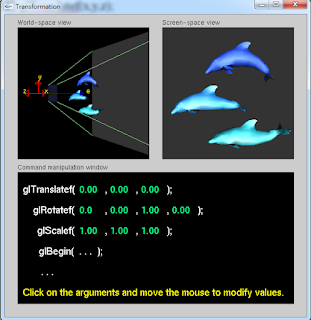


2.示範:glTranslatef(x,y,z);
(1)下載windows資料夾 - 開啟Transformation.exe

在Screen-space view滑鼠按右鍵可更換模型

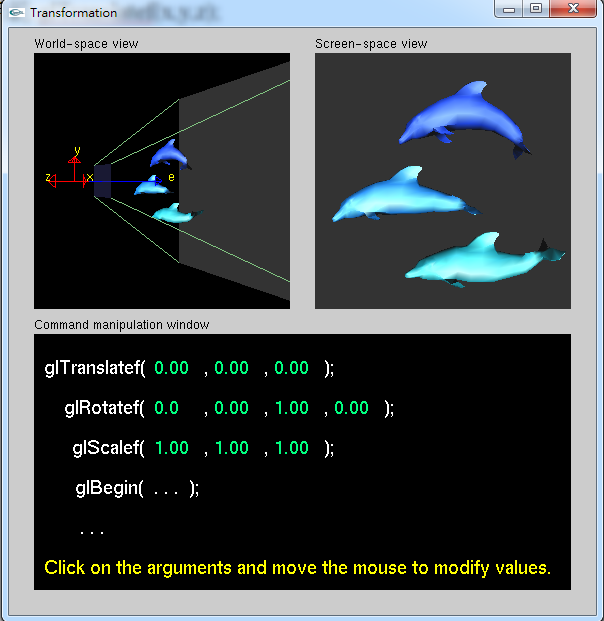
(2)開啟CodeBlocks - 開啟新project - 撰寫一個茶壺模型

利用glTranslatef移動模型

(3)利用函式撰寫出可用滑鼠移動模型
#include <GL/glut.h>
float x=0,y=0;///滑鼠motion
void display()
{
glClear(GL_COLOR_BUFFER_BIT|GL_DEPTH_BUFFER_BIT);
glPushMatrix();///備份矩陣
glTranslatef((x-150)/150.0,-(y-150)/150.0,0);///移動
glutSolidTeapot(0.3);
glPopMatrix();///還原矩陣 才不會有殘影
glutSwapBuffers();
}
void motion(int nowX,int nowY)
{
x=nowX; y=nowY;
display();///滑鼠motion馬上更新
}
int main(int argc,char**argv)
{
glutInit(&argc,argv);
glutInitDisplayMode(GLUT_DOUBLE|GLUT_DEPTH);
glutCreateWindow("week04");
glutDisplayFunc(display);
glutMotionFunc(motion);///滑鼠motion
glutMainLoop();
}


2019年3月7日 星期四
week03_showshowshow的筆記
1.主題:點.線.面.顏色
2.實作:第一個親手寫出


3.洩題:期中考題
4.回家作業:
至http://www.cmlab.csie.ntu.edu.tw/~jsyeh/3dcg10/下載win32.data以及glut32.dll
並開啟shapes.exe


訂閱:
文章 (Atom)