顯示具有 Week04 標籤的文章。 顯示所有文章

2019年3月14日 星期四

電腦圖學 Week04

電腦圖學

  1. 主題:移動
  2. 示範:glTranslatef(x,y,z)
  3. 主題:滑鼠

TODO:www.cmlab.csie.ntu.edu.tw/~jsyeh/3dcg10
下載:windows.zip 下載\windows\Transformation.exedata.zip 
下載\windows\data\模型glut32.dll 
下載\windows\glut32.dll

先去網站下載data,win32,glut32.dll


然後解壓縮把data放進去windows裡面


然後開啟Transformation.exe


開啟CodeBlocks GLUT
Download Freeglut3.0.0 MSVC Package
將檔案解壓縮後複製一個libfreeglut.a檔並重新命名為libglut32.a
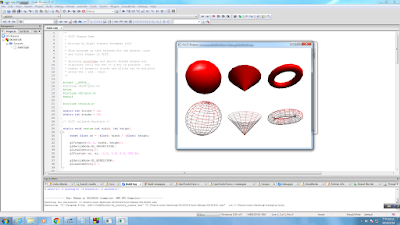
開啟Code Blocks>新增一個新的專案>點選Glut project
執行


然後做一個茶壺


程式碼#include <GL/glut.h>
void display(){

    glColor3f( 150/255.0 , 5/255.0 ,120/255.0 ); //上色
    glPushMatrix();
    glTranslatef(0.3,0.3,0);
    glutSolidTeapot(0.3);
    glPopMatrix();
    glutSwapBuffers();
}
int main(int argc, char**argv){
    glutInit(&argc, argv);
    glutInitDisplayMode(GLUT_DOUBLE | GLUT_DEPTH);
    glutCreateWindow("Week04_06160326");
    glutDisplayFunc(display);

    glutMainLoop();
}


新的程式碼:


#include <GL/glut.h>
float x=0, y=0;///滑鼠motion
void display(){
 glClear( GL_COLOR_BUFFER_BIT | GL_DEPTH_BUFFER_BIT);
//如果沒有這行程式就不能跟著滑鼠移動,會跑出很多茶壺,程式就會錯誤
    glPushMatrix();///備份矩陣
        glTranslatef( (x-150)/150.0, -(y-150)/150.0, 0);
        glutSolidTeapot(0.3);
        glColor3f( 150/255.0 , 5/255.0 ,120/255.0 );
    glPopMatrix();///還原矩陣,才不會再下次有舊的殘值
    glutSwapBuffers();
}

void motion(int nowX,int nowY){
    ///滑鼠motion
    x=nowX; y=nowY;///滑鼠motion
}///滑鼠motion

int main(int argc, char**argv){
    glutInit(&argc, argv);
    glutInitDisplayMode(GLUT_DOUBLE | GLUT_DEPTH);
    glutCreateWindow("Week04_06160326");
    glutDisplayFunc(display);
    glutMotionFunc(motion);///滑鼠motion
    glutMainLoop();
}


加glClear( GL_COLOR_BUFFER_BIT | GL_DEPTH_BUFFER_BIT);
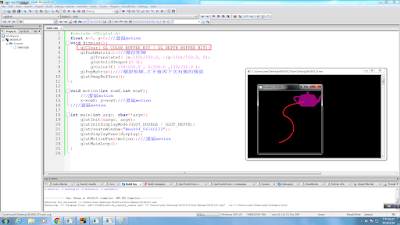
嗶啵啵嗶啵2019/0314_W4

第四週上課內容
(1)主題:移動


更改程式碼可移動位置
(他幫你移好)


更改程式碼可移動"隨意"位置
(手動移動)

Skr~SKR~好棒茶壺會動了


今日主題:移動
glTranslatef調整左右前後上下
glRotatef調整旋轉
glScalef調整大小


先把茶壺作出來
#include<GL/glut.h>
void display()
{ 
          glutSolidTeapot(0.3);

          glutSwapBuffers();
}
int main(int argc, char**argv)
{
    glutInit(&argc, argv);
    glutInitDisplayMode(GLUT_DOUBLE|GLUT_DEPTH);
    glutCreateWindow("week04");
    glutDisplayFunc(display);
 
    glutMainLoop();
}


茶壺會動了
#include<GL/glut.h>
float x=0, y=0;
void display()
{
    glClear( GL_COLOR_BUFFER_BIT | GL_DEPTH_BUFFER_BIT);
    glPushMatrix();
          glTranslatef((x-150)/150.0,-(y-150)/150.0,0);
          glutSolidTeapot(0.3);

          glPopMatrix();
          glutSwapBuffers();
}
void motion(int nowX, int nowY)
{
    x=nowX;y=nowY;
    display();
}
int main(int argc, char**argv)
{
    glutInit(&argc, argv);
    glutInitDisplayMode(GLUT_DOUBLE|GLUT_DEPTH);
    glutCreateWindow("week04");
    glutDisplayFunc(display);
    glutMotionFunc(motion);
    glutMainLoop();
}

六到布行的部落 3

20190307  Week3

1. 主題:點,線,面,顏色

從範例程式當中可以看到點線面顏色的範例


第一個親手寫出的程式碼

#include <GL/glut.h>
float x=0,y=0;
void display()
{
    glClear( GL_COLOR_BUFFER_BIT|GL_DEPTH_BUFFER_BIT);
    glPushMatrix();
    glTranslatef((x-150)/150.0,-(y-150)/150.0,0);
    glutSolidTeapot( 0.3 );
    glPopMatrix();
    glutSwapBuffers();
}
void motion(int nowX,int nowY)
{
    x=nowX; y=nowY;
    display();
}
int main(int argc, char**argv)
{
    glutInit(&argc,argv);
    glutInitDisplayMode(GLUT_DOUBLE|GLUT_DEPTH);
    glutCreateWindow("06160166_Week03!!");
    glutDisplayFunc(display);
    glutMotionFunc(motion);
    glutMainLoop();

}
回家作業


寶欸學習筆記


上周交到點線面顏色
這周教到移動跟旋轉
一樣下載老師的檔案解壓縮


位置要存在剛剛解壓縮的資料夾路徑
注意!!data資料夾解壓縮不要多一層資料夾


把城市馬改成由滑鼠移動
這樣查服就會跟著滑鼠走了

朱書樑的上課筆記w4

主題:移動
1.先到http://www.cmlab.csie.ntu.edu.tw/~jsyeh/3dcg10/將[data]、[win32]、[glut32.dll]下載。

2.將下載下來的windows解壓縮至windows\(E)

3.將解壓縮的windows檔案打開,並將data跟glut.dll拉進去

4.完成後,即可使用Transformation.exe

5.打開codeblocks並新增project GULT

6.將main.cpp中的預設程式碼刪除,並打入新的程式碼
   程式碼:
#include <GL/glut.h>
float x=0,y=0; (滑鼠位置)
void display()
{
    glClear(GL_COLOR_BUFFER_BIT | GL_DEPTH_BUFFER_BIT);
    glPushMatrix();   (矩陣備份)
    glTranslatef((x-150)/150.0,-(y-150)/150.0,0);  (圖形移動)
    glutSolidTeapot( 0.3 );
    glPopMatrix();   (還原矩陣,不會出現多餘的圖形)
    glutSwapBuffers();
}
void motion(int nowX,int nowY)
{
    x=nowX,y=nowY;  (滑鼠位置)
    display();  (螢幕馬上更新)
}
int main(int argc, char**argv)
{
    glutInit(&argc,argv);
    glutInitDisplayMode(GLUT_DOUBLE | GLUT_DEPTH);
    glutCreateWindow("week04");
    glutDisplayFunc(display);
    glutMotionFunc(motion); (滑鼠位置)
    glutMainLoop();
}

7.打完程式碼後按下執行即可


比利安娜工作室-balaboom_Week04

Week04 2019/03/14
(1)主題:移動
下載windows.zip and data.zip and glut32.dll
然後將windows.zip解壓縮,再將glut32.dll複製到解壓完的windows裡
之後開啟Transformation.exe

🌑不同的角度大小及圖形也會呈現出不一樣的畫面
(2)示範:glTranslatef(x,y,z)
  1. 先去https://www.transmissionzero.co.uk/software/freeglut-devel/網站下載Download freeglut 3.0.0 for MinGW 
  2. 將解壓縮後的檔案放在桌面,之後將裡面的lib資料夾做動作如下圖
  3. 開他媽的codeblocks,建立一個glut專案(步驟已經在前幾的禮拜熟悉了~~)
  4. 開始撰寫程式(這是Week03的程式碼)
  5. 今天要加上glTranslatef的指令使他改變位置(多了3行程式碼)
(3)主題:滑鼠
  1. 由於強大寫程式的人控制滑鼠移動圖片居多,小葉老師教同學如何運滑鼠移動

05160185嗷嗷

                           1.     先到 http://www.cmlab.csie.ntu.edu.tw/~jsyeh/3dcg10/? fbclid=IwAR1wVtrCpU0hOgdHqIsqXhjzIEIiq2SEjXx2MmxUtVi5gW0FX06gI9A7yKA
                          2.     下載win32  glut32.dll  data

                           3.把windows解壓縮   

                                             
                            4. 把 data 資料夾跟 glut32.dll 丟到 windows        

                            5 .到windows裡面開啟Transformation.exe可以看到東西

                         6. 更改數值可以移動物體

                     7.打程式碼 執行


郁婷 a 筆記 (移動/旋轉/縮放與矩陣(Matrix)

1.進入 www.cmlab.csie.ntu.edu.tw/~jsyeh/3dcg10
           下載:(1)windows.zip → 下載 / windows / Transformation.exe
                       (2)data.zip → 下載 / windows / data / 模型
                       (3)glut32.dll → 下載 / windows / glut32.dll

2.打開Code::Blocks → File → New → Project → GLUT project

   輸入成以下畫面


3.接著要下載我們需要的東西:
  (1)上網搜尋" freeglut windows "
        (2)選擇"  freeglut Windows Development Libraries - Transmission Zero "
        (3)選擇" freeglut 3.0.0 MinGW Package "並下載檔案丟至桌面解壓縮
        (4)點開" lib "資料夾,複製" libfreeglut.a "檔案並改名為" libglut32.a "

4.回到Code::Blocks繼續操作
   選擇剛剛的資料夾位置


一直接續到 Finish

5.將程式碼刪除並Key In我們自己的程式碼

#include <GL/glut.h>
void display()
{
    glPushMatrix(); ///備份矩陣
        glTranslatef( 0.3, 0.3, 0 ); ///移動 (會改矩陣)
        glutSolidTeapot( 0.3 );
    glPopMatrix(); ///還原矩陣,才不會再下次有舊的殘值
    glutSwapBuffers();
}
int main (int argc, char**argv)
{
    glutInit(&argc, argv);
    glutInitDisplayMode(GLUT_DOUBLE | GLUT_DEPTH);
    glutCreateWindow("week04");
    glutDisplayFunc(display);

    glutMainLoop();
}

(如圖下所示)


6.將圖檔可以跟著滑鼠移動,所以將程式碼改成

#include <GL/glut.h>
float x=0, y=0; ///滑鼠motion
void display()
{
    glClear(GL_COLOR_BUFFER_BIT | GL_DEPTH_BUFFER_BIT );
    glPushMatrix(); ///備份矩陣
        glTranslatef( (x-150)/150.0, -(y-150)/150.0, 0 );///滑鼠motion
        glutSolidTeapot( 0.3 );
    glPopMatrix();///還原矩陣,才不會再下次有舊的殘值
    glutSwapBuffers();
}
void motion(int nowX, int nowY)///滑鼠motion
{
    x=nowX; y=nowY;
    display(); //////滑鼠motion 馬上更新
}///滑鼠motion
int main (int argc, char**argv)
{
    glutInit(&argc, argv);
    glutInitDisplayMode(GLUT_DOUBLE | GLUT_DEPTH);
    glutCreateWindow("week04");
    glutDisplayFunc(display);
    glutMotionFunc(motion);///滑鼠motion

    glutMainLoop();
}

(如圖下所示)


以上就是今天的上課內容~~~~~ (๑´ㅂ`๑) /

06160805的課堂筆記_W4

電腦圖學
1.主題:移動
2.示範:glTranslatef(x,y,z)
3.主題:滑鼠


(1)到http://www.cmlab.csie.ntu.edu.tw/~jsyeh/3dcg10/
下載:data,windows,glut32.dll


(2)解壓縮後,將data,glut32.dll放入windows資料夾中


(3-1)原本的茶壺不能移動


(3-2)多加了兩行程式碼,就能使茶壺移動


(4)加上螢光的程式碼是可以讓滑鼠直接移動茶壺的位置